



Table of Contents
Introduction
Here’s a sobering reality: Two out of every three software projects fail to meet their original goals.
That’s not an exaggeration—it’s based on comprehensive industry research. 66% of software development projects either exceed their budget, miss their deadline, fail to deliver the promised features, or are abandoned entirely before launch.
The financial impact? Companies waste an estimated $260 billion annually on failed software projects globally.
But here’s the thing: The 34% that succeed aren’t just lucky. They follow a proven process.
Think about it—you wouldn’t build a house without a blueprint, yet many businesses rush into software development with nothing more than a vague idea and hope. The result? Cost overruns, missed deadlines, frustrated teams, and products that nobody wants to use.
So what separates the winners from the failures?
It’s not bigger budgets (some of the most expensive projects fail spectacularly). It’s not smarter developers (talent alone can’t overcome poor planning). And it’s not cutting-edge technology (the wrong process will waste even the best tools).
The difference comes down to following a structured, proven development process.
In this comprehensive guide, you’ll discover the exact 8-step framework that successful companies use to transform ideas into valuable, market-ready applications. Whether you’re a startup founder with a groundbreaking concept, a business leader digitizing operations, or an entrepreneur entering the tech space, this roadmap will help you join the 34% that succeed.
Let’s make sure your project isn’t part of the statistic.
What is the Software Development Process?
The software development process is a structured approach to creating software applications from initial concept to final deployment and beyond. It’s a systematic framework that guides teams through planning, designing, building, testing, and maintaining software products.
Think of it as a roadmap that helps you:
- Minimize risks by identifying potential problems early
- Control costs through careful planning and resource allocation
- Ensure quality with rigorous testing and validation
- Meet deadlines by breaking work into manageable phases
- Deliver value by focusing on user needs and business objectives
According to the Project Management Institute, organizations that follow structured development processes are 2.5 times more likely to complete projects successfully than those that don’t. This isn’t just about following rules—it’s about building better software, faster and more efficiently.
Why Following a Structured Process Matters
The Cost of Poor Planning
Industry research shows that approximately 66% of software projects fail to meet their original goals, and poor planning is a leading cause. When you skip or rush through the development process, you risk:
- Scope creep: Features continuously expand without corresponding increases in budget or timeline
- Technical debt: Quick fixes accumulate, making future changes exponentially more difficult
- Security vulnerabilities: Rushed development often overlooks critical security considerations
- User dissatisfaction: Products built without proper research rarely meet actual user needs
- Budget overruns: The average software project exceeds its budget by 27%
The Benefits of Structure
A well-defined process provides:
- Clear communication: Everyone understands what needs to be done, when, and why
- Better resource management: You allocate time, budget, and talent efficiently
- Risk mitigation: Problems are identified and addressed before they become crises
- Quality assurance: Built-in checkpoints ensure standards are maintained
- Scalability: The process adapts as your project and team grow
- Documentation: Knowledge is captured for future reference and team onboarding
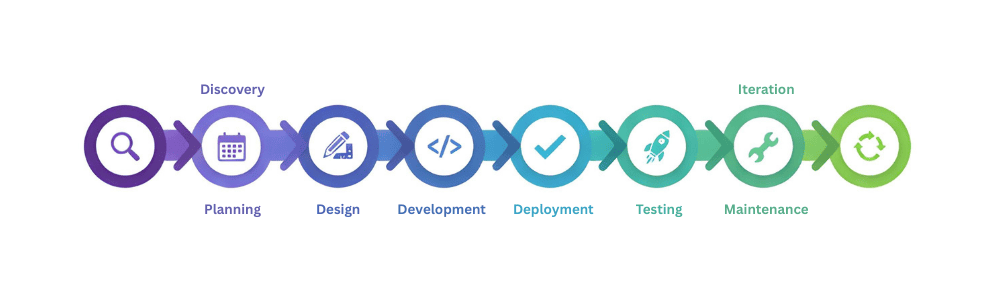
The 8 Essential Steps in Software Development
Step 1: Discovery and Requirement Analysis
What happens: This initial phase is all about understanding the “why” behind your software. You’re identifying the problem you’re solving, who you’re solving it for, and what success looks like.
Key activities:
- Stakeholder interviews: Gather input from everyone who will be affected by the software
- Market research: Analyze competitors, industry trends, and potential opportunities
- User research: Understand your target audience’s pain points, behaviors, and needs
- Business case development: Define clear objectives, expected ROI, and success metrics
- Requirement documentation: Create detailed specifications of what the software must do
Deliverables:
- Project charter or vision document
- User personas and journey maps
- Functional and non-functional requirements
- Success criteria and KPIs
- Initial risk assessment
Pro tip: Spend adequate time in this phase. The cost of changing requirements increases exponentially as development progresses. According to IBM, fixing a bug found during the requirements phase costs 5-10 times less than fixing one found during testing, and up to 100 times less than fixing one in production.
Step 2: Planning and Feasibility Study
What happens: With requirements in hand, you now create a detailed roadmap for bringing your software to life. This involves evaluating technical feasibility, estimating resources, and creating timelines.
Key activities:
- Technical feasibility analysis: Determine if your requirements can be met with available technology
- Technology stack selection: Choose programming languages, frameworks, databases, and tools
- Resource planning: Identify team members, skills needed, and external resources
- Budget estimation: Calculate development costs, infrastructure, licensing, and contingencies
- Timeline creation: Develop realistic schedules with milestones and dependencies
- Risk management planning: Identify potential obstacles and mitigation strategies
Deliverables:
- Project plan with timelines and milestones
- Resource allocation chart
- Detailed budget breakdown
- Technology stack documentation
- Risk register with mitigation strategies
- Communication plan
Choosing your approach: This is when you select your development methodology:
- Agile/Scrum: Best for projects with evolving requirements, need for flexibility
- Waterfall: Suitable for well-defined projects with stable requirements
- DevOps: Ideal when continuous delivery and rapid iteration are priorities
- Hybrid approaches: Combine elements based on your specific needs
Pro tip: Build in buffers. Most teams underestimate development time. The planning fallacy suggests people tend to be overly optimistic about how long tasks will take. Add 20-30% buffer time to your initial estimates.
Step 3: Design and Architecture
What happens: Before writing a single line of code, you create the blueprint for your software. This includes both the user-facing design and the underlying technical architecture.
Key activities:
UX/UI Design:
- Information architecture: Organize content and features logically
- Wireframing: Create low-fidelity layouts of screens and workflows
- Prototyping: Build interactive mockups to test user flows
- Visual design: Develop the look and feel, including colors, typography, and branding
- Design system creation: Establish reusable components and style guides
Technical Architecture:
- System architecture design: Define how different components interact
- Database schema design: Structure how data will be stored and accessed
- API design: Plan how different parts of the system communicate
- Security architecture: Build in protection from the ground up
- Scalability planning: Ensure the system can grow with demand
Deliverables:
- Wireframes and interactive prototypes
- UI/UX design specifications
- System architecture diagrams
- Database models
- API documentation
- Security framework
- Design system and style guide
Why design matters: According to research from Forrester, every dollar invested in UX design returns between $2 and $100. Good design isn’t just about aesthetics—it directly impacts user adoption, satisfaction, and your bottom line.
Pro tip: Involve users early. Test your prototypes with real users before committing to development. It’s far easier and cheaper to change a design than to refactor code.
Step 4: Development and Implementation
What happens: This is where your software comes to life. Developers write code based on the designs and specifications created in previous phases.
Key activities:
- Environment setup: Configure development, staging, and testing environments
- Frontend development: Build the user interface and client-side functionality
- Backend development: Create server-side logic, databases, and APIs
- Integration: Connect different components and third-party services
- Version control: Use Git or similar systems to manage code changes
- Code reviews: Ensure quality through peer review processes
- Documentation: Write technical documentation for future maintenance
Best practices:
- Follow coding standards: Establish and enforce consistent coding conventions
- Write clean, maintainable code: Prioritize readability and simplicity
- Implement continuous integration: Automatically test code as it’s written
- Use modular architecture: Build components that can be reused and tested independently
- Security by design: Implement security measures at every layer
- Performance optimization: Write efficient code that scales
Development methodologies in action:
- Sprint-based development: Break work into 1-4 week iterations with clear goals
- Daily standups: Keep team aligned with brief daily check-ins
- Pair programming: Two developers work together for complex problems
- Test-driven development (TDD): Write tests before writing code
Common technologies:
- Web applications: React, Angular, Vue.js, Node.js, Python, Ruby on Rails
- Mobile apps: Swift, Kotlin, React Native, Flutter
- Backend: Java, .NET, Python, Node.js, Go
- Databases: PostgreSQL, MongoDB, MySQL, Redis
- Cloud platforms: AWS, Azure, Google Cloud
Pro tip: Avoid the temptation to skip documentation. Future you (and your team) will thank present you for clear, comprehensive code comments and technical docs.
Step 5: Quality Assurance and Testing
What happens: Systematic testing ensures your software works as intended, is free from critical bugs, and delivers a positive user experience. Quality assurance isn’t just a phase—it should be integrated throughout development.
Types of testing:
Functional Testing:
- Unit testing: Test individual components in isolation
- Integration testing: Verify that different modules work together correctly
- System testing: Test the complete, integrated application
- User acceptance testing (UAT): Confirm the software meets business requirements
Non-Functional Testing:
- Performance testing: Ensure the application handles expected load
- Load testing: Determine how the system behaves under heavy traffic
- Security testing: Identify vulnerabilities and weaknesses
- Usability testing: Verify the interface is intuitive and user-friendly
- Compatibility testing: Confirm it works across devices, browsers, and operating systems
Specialized Testing:
- Regression testing: Ensure new changes don’t break existing functionality
- Accessibility testing: Verify compliance with WCAG standards
- Localization testing: Check translations and regional variations
Key activities:
- Create comprehensive test plans and test cases
- Set up automated testing frameworks
- Conduct manual exploratory testing
- Document and track bugs in a bug tracking system
- Prioritize and fix issues based on severity
- Retest after fixes are implemented
- Perform regression testing before releases
Deliverables:
- Test plans and test cases
- Bug reports and tracking
- Test coverage reports
- Performance benchmarks
- Security audit results
Pro tip: Automate where possible. Automated tests can run continuously, catching bugs immediately. However, don’t rely solely on automation—human testers catch usability issues that automated tests miss.
Step 6: Deployment and Release
What happens: Your software is ready for the world. This phase involves moving your application from development to production environments where real users can access it.
Key activities:
Pre-Deployment:
- Final testing: Conduct last-minute checks in staging environment
- Deployment planning: Create detailed deployment procedures and rollback plans
- Infrastructure setup: Configure production servers, databases, and services
- Security hardening: Implement firewalls, SSL certificates, and access controls
- Performance optimization: Fine-tune caching, CDN setup, and database queries
Deployment Strategies:
- Big bang deployment: Replace old system entirely in one go (higher risk)
- Phased rollout: Deploy to user groups gradually
- Blue-green deployment: Maintain two identical environments, switch traffic instantly
- Canary releases: Deploy to a small subset of users first, then expand
- Feature flags: Deploy code but control when features become active
Post-Deployment:
- Monitor system performance and error rates
- Track user adoption and engagement metrics
- Be prepared for immediate hotfixes if critical issues arise
- Gather initial user feedback
- Document deployment process and lessons learned
Deliverables:
- Production environment (live application)
- Deployment documentation
- Operations manuals
- Monitoring dashboards
- Backup and disaster recovery procedures
- User training materials
DevOps practices: Modern deployment leverages continuous integration/continuous deployment (CI/CD) pipelines that automate testing and deployment, enabling rapid, reliable releases.
Pro tip: Never deploy on Fridays (unless absolutely necessary). If something goes wrong, you want your full team available to respond, not scattered for the weekend.
Step 7: Maintenance and Support
What happens: Software development doesn’t end at launch. Ongoing maintenance keeps your application secure, functional, and relevant as technology and user needs evolve.
Types of maintenances
Corrective Maintenance:
- Fix bugs reported by users
- Address performance issues
- Resolve security vulnerabilities
- Correct errors in logic or calculations
Adaptive Maintenance:
- Update for new operating system versions
- Ensure compatibility with new devices
- Adapt to changing regulations (GDPR, CCPA, etc.)
- Integrate with updated third-party services
Perfective Maintenance:
- Enhance existing features based on user feedback
- Improve performance and efficiency
- Refine user interface elements
- Optimize database queries
Preventive Maintenance:
- Update dependencies and libraries
- Refactor code to reduce technical debt
- Improve documentation
- Strengthen security measures proactively
Key activities:
- Monitoring: Track application performance, uptime, and errors in real-time
- User support: Provide help desk services and respond to user inquiries
- Regular updates: Apply security patches and minor improvements
- Backup management: Ensure data is regularly backed up and recoverable
- Performance tuning: Continuously optimize for speed and efficiency
- License management: Keep software licenses and subscriptions current
Support models:
- L1 Support: Basic troubleshooting and user assistance
- L2 Support: Technical support requiring deeper knowledge
- L3 Support: Advanced support from developers for complex issues
Pro tip: Plan for maintenance from day one. Allocate 15-20% of your initial development budget for ongoing annual maintenance. This prevents technical debt from accumulating and keeps your software competitive.
Statistics: On average, organizations spend 60-80% of their software budget on maintenance and support rather than new development, according to industry research.
Step 8: Iteration and Optimization
What happens: The best software evolves based on real-world usage and feedback. This final step is really a new beginning—you gather insights, identify opportunities, and plan enhancements.
Key activities:
Data Collection and Analysis:
- Analyze user behavior through analytics platforms
- Review support tickets and user feedback
- Monitor key performance indicators (KPIs)
- Conduct user surveys and interviews
- A/B test new features and improvements
Identifying Opportunities:
- Feature requests from users
- Market trends and competitor analysis
- Emerging technologies that could add value
- Areas where users struggle or drop off
- Performance bottlenecks
Planning Next Steps:
- Prioritize enhancements using frameworks like RICE (Reach, Impact, Confidence, Effort)
- Create product roadmap for future releases
- Allocate resources for upcoming development
- Set goals for the next iteration
Continuous Improvement:
- Implement lean and agile principles
- Build feedback loops into your process
- Embrace data-driven decision making
- Stay connected to your users’ evolving needs
Deliverables:
- Analytics reports and insights
- User feedback summaries
- Product roadmap
- Prioritized feature backlog
- Updated business case with ROI data
Pro tip: Release early, release often. Don’t wait for perfection. Ship a minimum viable product (MVP), learn from real users, and iterate based on actual data rather than assumptions.
The iteration mindset: Companies like Amazon, Google, and Netflix release updates continuously—sometimes multiple times per day. This iterative approach allows them to respond quickly to user needs and market changes.
Choosing the Right Development Methodology
Different projects require different approaches. Here’s how to choose the right methodology for your needs:
Agile/Scrum
Best for: Projects with evolving requirements, need for frequent releases, collaborative teams
Advantages:
- Flexibility to adapt to changing requirements
- Regular feedback and course correction
- Faster time to market with incremental releases
- High collaboration and transparency
Challenges:
- Requires experienced teams
- Can be difficult to predict final timeline and cost
- Needs active stakeholder involvement
Use when: You’re building innovative products, working in competitive markets, or when requirements are likely to change.
Waterfall
Best for: Projects with well-defined, stable requirements, regulatory environments
Advantages:
- Clear structure and milestones
- Comprehensive documentation
- Predictable timelines and budgets
- Works well with fixed-price contracts
Challenges:
- Inflexible to changes
- Testing happens late in the cycle
- Users don’t see the product until late stages
Use when: You’re working on projects with strict compliance requirements, fixed budgets, or when requirements are unlikely to change.
DevOps
Best for: Organizations prioritizing continuous delivery, automation, and rapid iteration
Advantages:
- Faster release cycles
- Improved collaboration between development and operations
- Automated testing and deployment
- Better quality through continuous feedback
Challenges:
- Requires cultural shift
- Initial investment in tools and training
- Needs organizational buy-in
Use when: You need to deploy updates frequently, have high uptime requirements, or operate at scale.
Hybrid Approaches
Many organizations combine methodologies. For example, using Agile for development while maintaining Waterfall-style gates for compliance and budgeting.
Common Pitfalls to Avoid
Even with a solid process, teams can stumble. Watch out for these common mistakes:
1. Insufficient Requirements Gathering
The problem: Rushing through discovery leads to building the wrong product.
The solution: Invest time upfront. Interview stakeholders, research users, document thoroughly.
2. Scope Creep
The problem: Continuously adding features without adjusting timeline or budget.
The solution: Implement change control processes. Evaluate new requests against business value and cost.
3. Inadequate Testing
The problem: Skipping or rushing QA to meet deadlines results in buggy releases.
The solution: Make testing non-negotiable. Build quality assurance into your timeline.
4. Poor Communication
The problem: Team members, stakeholders, and users aren’t aligned.
The solution: Establish regular check-ins, use collaboration tools, maintain clear documentation.
5. Ignoring Technical Debt
The problem: Taking shortcuts accumulates problems that become expensive to fix.
The solution: Allocate time for refactoring, code reviews, and addressing technical debt.
6. Overlooking Security
The problem: Treating security as an afterthought creates vulnerabilities.
The solution: Implement security at every phase. Conduct regular security audits.
7. Lack of User Involvement
The problem: Building based on assumptions rather than user needs.
The solution: Involve users throughout—from research to testing to feedback.
8. Unrealistic Timelines
The problem: Underestimating complexity leads to rushed work and burnout.
The solution: Use historical data for estimates, include buffers, be honest about limitations.
Measuring Software Development Success
How do you know if your software development process is working? Track these key metrics:
Process Metrics
- Velocity: Amount of work completed per sprint (Agile teams)
- Cycle time: Time from starting work to deployment
- Lead time: Time from request to delivery
- Deployment frequency: How often you release updates
- Change failure rate: Percentage of deployments causing failures
Quality Metrics
- Defect density: Number of bugs per thousand lines of code
- Test coverage: Percentage of code covered by automated tests
- Mean time to recovery (MTTR): How quickly you fix production issues
- Code review turnaround time: Speed of peer review process
Business Metrics
- Return on investment (ROI): Value generated versus cost
- User adoption rate: How quickly users start using the software
- Customer satisfaction (CSAT): User happiness with the product
- Net promoter score (NPS): Likelihood users recommend your software
- Time to market: Speed from concept to launch
Technical Metrics
- Application performance: Response times, load times
- Uptime/availability: System reliability
- Scalability: Ability to handle growth
- Technical debt ratio: Code quality and maintainability
Pro tip: Don’t track metrics just to have numbers. Choose 3-5 key metrics that align with your business goals and use them to drive decisions.
Conclusion: Your Path to Software Success
Building successful software isn’t about coding faster—it’s about following a process that ensures you build the right thing, the right way. The eight-step framework outlined in this guide provides a proven path from initial idea to market success:
- Discovery and Requirement Analysis – Understand what you’re building and why
- Planning and Feasibility Study – Create a realistic roadmap
- Design and Architecture – Blueprint your solution
- Development and Implementation – Build your software
- Quality Assurance and Testing – Ensure it works flawlessly
- Deployment and Release – Launch to your users
- Maintenance and Support – Keep it running smoothly
- Iteration and Optimization – Continuously improve
Remember that these steps aren’t strictly sequential—modern development approaches often overlap phases, incorporating feedback loops and continuous improvement. The key is maintaining discipline around each phase’s core activities while adapting the process to your specific needs.
Whether you’re building a simple mobile app or a complex enterprise system, this framework helps you:
- Minimize risks and avoid costly mistakes
- Deliver software that users actually want
- Stay on budget and on schedule
- Build products that scale and evolve
- Create competitive advantage through better software
Ready to Start Your Software Development Journey?
Every successful software product begins with a solid plan and the right development partner. If you’re ready to transform your idea into a valuable application, we’re here to help.
At SSNTPL, we’ve guided hundreds of businesses through the software development process, delivering custom applications that drive real business results. Our experienced team specializes in:
- Custom application development tailored to your unique needs
- Modern web and mobile applications built with cutting-edge technologies
- Enterprise solutions that scale with your business
- Expert UI/UX design that users love
- Comprehensive DevOps and cloud infrastructure
- AI, machine learning, and blockchain solutions
[Contact us today for a free consultation] – Let’s discuss your project and create a roadmap to success.
Frequently Asked Questions
Project timelines vary based on complexity, features, and team size. A simple mobile app might take 3-4 months, while a complex enterprise system could take 12-18 months or more. The planning phase helps establish realistic timelines for your specific project.
Agile is iterative and flexible, with frequent releases and adaptability to changes. Waterfall is sequential and structured, with clearly defined phases. Agile works better for evolving requirements, while Waterfall suits projects with stable, well-defined specifications.
No, but understanding the process helps. A good development team will communicate in business terms, not just technical jargon. Focus on clearly communicating your business needs and goals—the technical team translates these into software specifications.
Security must be built in from the start, not added later. This includes secure architecture design, regular security testing, code reviews, keeping dependencies updated, and following security best practices. Working with experienced developers who prioritize security is essential.
With Agile methodologies, changes are expected and managed through sprint planning and backlog prioritization. With Waterfall, changes require formal change control processes and may impact timeline and budget. The key is having a clear process for evaluating and implementing changes.