Best MCP Servers for Software Development Teams (2026)
**TL;DR:**TL;DR
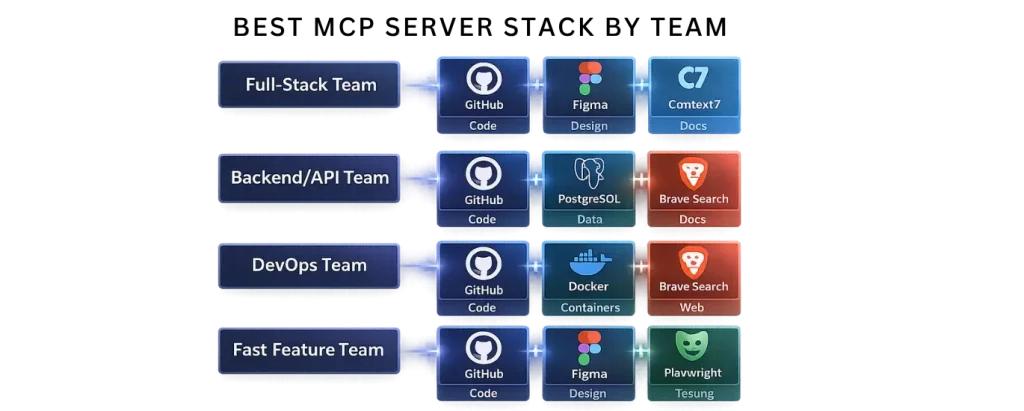
Most development teams should only run 3 MCP servers: one for code (usually GitHub), one for knowledge (either Context7 or Brave Search), and one specialized server like Figma, PostgreSQL, or Docker. Installing more creates token bloat, slower responses, and more confusion than value.
If you’re new to MCP, start with our complete guide on Model Context Protocol (MCP) to understand how MCP works before choosing servers.
MCP is only as valuable as the servers you connect to it. With over 10,000 public servers in the ecosystem, knowing which ones actually matter for a development workflow — and how to configure them together — is the difference between productivity gains and token bloat.
This guide covers the eight best MCP servers for software development teams deploy most, why each one matters, how to set them up, and the combinations that work best together. Unlike generic “top 10” lists, we’ve tested each in production contexts and included the real gotchas.
The Core Principle: Start With Three, Add Deliberately
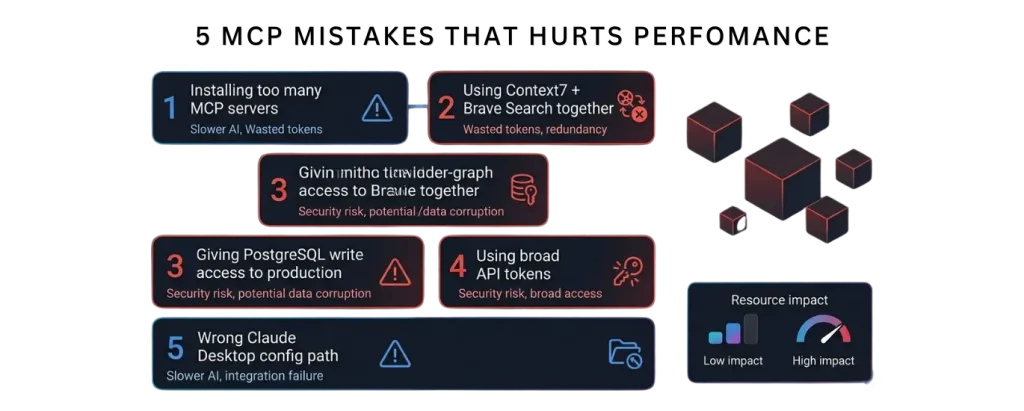
The most common mistake: installing ten MCP servers and wondering why your AI assistant is slow and confused.
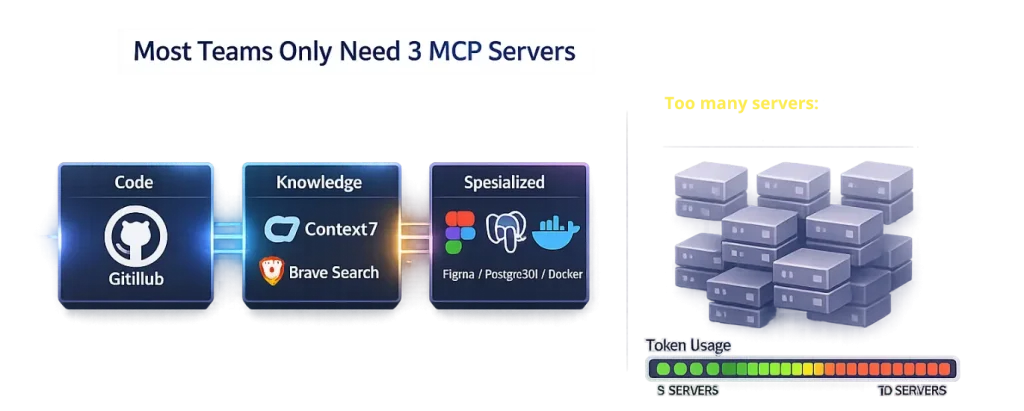
Each MCP server’s tool definitions consume 500–1,500 tokens in your context window before you ask anything. Five servers with 12 tools each means 30,000+ tokens spent just advertising capabilities — before any actual work happens.
These servers extend the core MCP architecture explained in our detailed Model Context Protocol (MCP) guide.
Server 1: GitHub MCP — The Essential One
Use case: Repository browsing, code search, issue/PR management, CI/CD triggering
Maintenance: Official (GitHub)
Free tier: Yes (100+ requests/day per token limit)
Token cost: 1,200–1,500 tokens
Setup time: 5 minutes
Production-ready: Yes (used by GitHub engineers internally)
GitHub MCP is the most widely deployed MCP server in the ecosystem. Not because it is flashy. Because it solves the highest-friction problem: your AI assistant works in your IDE but your issues and PRs live in GitHub.
What it does:
- Search and read files, branches, and commit history
- List, create, and comment on issues
- View, create, and merge pull requests
- Trigger GitHub Actions workflows
- Search across the entire repo without copy-pasting
Why this matters for teams:
Without GitHub MCP, the workflow is: developer switches to GitHub, finds the issue, copies context back to IDE, asks Claude about it. With GitHub MCP, you stay in your editor: “Show me open issues labeled ‘backend’ and summarize the most recent PR comments.”
Setup:
json
{
  "mcpServers": {
    "github": {
      "command": "npx",
      "args": ["-y", "@modelcontextprotocol/server-github"],
      "env": {
        "GITHUB_PERSONAL_ACCESS_TOKEN": "ghp_your_token_here"
      }
    }
  }
}
For Claude Desktop on macOS, this goes in ~/Library/Application Support/Claude/claude_desktop_config.json. On Windows, it’s %APPDATA%\Claude\claude_desktop_config.json.
Token scoping: Create a personal access token with repo and read:org permissions. Do not use a token with admin access. If your team shares a GitHub org, use a machine user token with minimal scopes.
Common gotchas:
- Path format: Always use absolute paths in the config file. Relative paths fail silently.
- Token expiry: GitHub tokens expire. If the server stops working, regenerate your token.
- Organization visibility: The token only sees repos you can access. If the agent claims a repo doesn’t exist, check your token permissions first.
- Rate limits: GitHub API limits are strict. The server queues requests, but if you have 5+ agents hitting the same API token simultaneously, you’ll hit limits. Dedicated machine tokens help.
Best teammates:
GitHub MCP pairs excellently with filesystem access (for reading local code) and Brave Search (for external context). Do not pair with Context7 unless your repo is documentation-heavy; the combination floods context.
What competitors miss:
Most “GitHub integration” guides show only the installation. They don’t cover token scoping (critical for security), rate limiting (critical for production), or the organizational patterns (what to do when multiple teams share one GitHub org). Those are the problems you actually hit.
Server 2: Context7 — The Documentation Resolver
Use case: Live framework documentation, API reference, preventing hallucination
Maintenance: Anthropic-backed, well-maintained
Free tier: Yes (50+ queries/day)
Token cost: 1,000–1,300 tokens
Setup time: 3 minutes
Production-ready: Yes
The single most recommended MCP server in developer communities right now. Not because it is elegant. Because it solves the most painful hallucination: your AI generates code against a library API that changed three months ago.
What it does:
Context7 fetches current documentation for frameworks, libraries, and languages in real time. Instead of relying on training data, the AI grounds answers in today’s docs.
Ask Claude: “Show me the latest syntax for React Server Components.” Without Context7: “Here’s what I remember from my training data…” With Context7: “Let me fetch the current React docs… Here is today’s syntax with the exact imports.”
Why this matters:
The faster the ecosystem moves, the more critical this becomes. If you work with:
- React / Next.js (API changes constantly)
- LLMs and AI frameworks (shipping new APIs weekly)
- TypeScript (new features every 3 months)
- Node.js / npm ecosystem (deprecations happen monthly)
…Context7 is not optional. It is your team’s guardrail against generating code that worked six months ago.
Setup:
json
{
  "mcpServers": {
    "context7": {
      "command": "npx",
      "args": ["-y", "context7-mcp"],
      "env": {
        "CONTEXT7_API_KEY": "your_api_key_here"
      }
    }
  }
}
Sign up for a free API key at context7.dev. No credit card required. The free tier is sufficient for most development teams.
Real-world example:
Team building with Next.js 15, which shipped async server component support in April 2026. An AI without Context7 would suggest the old React class component syntax. With Context7, it fetches the actual Next.js 15 docs and generates the async component correctly on the first try.
What competitors miss:
Most guides install Context7 and stop. They don’t explain how to combine it with GitHub MCP (to avoid redundant documentation lookups), or how to scope which docs to fetch (triggering unnecessary API calls adds latency). The smart pattern: use GitHub MCP to search your codebase and PRs, use Context7 only when the AI asks “what’s the API for X?”
Server 3: Figma MCP — The Design-to-Code Bridge
Use case: Design handoff, frontend implementation, design system extraction
Maintenance: Official (Figma)
Free tier: Yes (with Figma free account)
Token cost: 800–1,200 tokens (live design data is large)
Setup time: 10 minutes
Production-ready: Yes (used by Figma’s design partners)
The design-to-code problem: a designer shares a Figma file with a developer. Developer opens it, manually copies spacing values, color codes, component names, and layout rules. Figma MCP makes the AI read the design directly.
What it does:
Exposes the live Figma document structure — layer hierarchy, auto-layout rules, component variants, text styles, color tokens — to your AI assistant. The AI generates code against the real design, not a screenshot.
Example workflow:
Designer drops a new button component in Figma. You ask Claude: “Generate React code for the new button component in Figma.”
Claude reads the Figma design directly: layer name, colors, padding, text styles, interaction states. Generates production-ready React + Tailwind that matches the design without a single manual copy-paste.
Setup:
json
{
  "mcpServers": {
    "figma": {
      "command": "npx",
      "args": ["-y", "@figma/mcp-server"],
      "env": {
        "FIGMA_ACCESS_TOKEN": "your_figma_api_token"
      }
    }
  }
}
Generate a token at figma.com/api/token. The server needs access to only the files you specify (for security and token efficiency).
Why this matters:
Design debt is development debt. If designers ship a component and developers implement it by guessing from screenshots, you get misaligned spacing, color variations, and responsive behavior that doesn’t match intent. Figma MCP eliminates that gap.
When to use it:
- Frontend teams with active design systems
- Startups shipping features fast (design handoff is the bottleneck)
- Teams doing accessibility work (Figma has contrast ratios; the AI can verify)
When not to use it:
- Internal tools with no design spec
- Backend-heavy projects
- Teams that rarely ship UI changes
Server 4: Brave Search MCP — The Real-Time Web
Use case: Live web search, current events, recent API announcements, package versions
Maintenance: Official (Brave)
Free tier: Yes (2,000 requests/month)
Token cost: 600–900 tokens
Setup time: 3 minutes
Production-ready: Yes
Solves the knowledge-cutoff problem for information that changes after your AI’s training data. New framework release? New security vulnerability? New library landing? Without Brave Search, your AI doesn’t know it exists.
What it does:
Your AI can search the live web through Brave’s independent search index (no Google tracking, no ad skew). Returns results with titles, descriptions, and URLs.
Setup:
json
{
  "mcpServers": {
    "brave-search": {
      "command": "npx",
      "args": ["-y", "@modelcontextprotocol/server-brave-search"],
      "env": {
        "BRAVE_SEARCH_API_KEY": "your_api_key"
      }
    }
  }
}
Free tier: sign up at api.search.brave.com. You get 2,000 queries per month free.
Real example:
February 2026, a new critical vulnerability in a popular npm package releases. Your training data ends in January 2026. Without Brave Search, your AI generates code using the vulnerable version. With it: “Check the latest security advisories for lodash” → fetches the current CVE database → suggests the patched version.
When not to use it:
If you pair Brave Search with Context7, you get redundant results. Either:
- Use Brave Search for general web research
- Use Context7 for framework/library documentation
- Do not use both together (wastes tokens)
Server 5: Playwright MCP — Browser Automation
Use case: Web scraping, accessibility testing, end-to-end test generation
Maintenance: Official (Microsoft)
Free tier: Yes (unlimited local use)
Token cost: 1,000–1,500 tokens
Setup time: 5 minutes
Production-ready: Yes
Playwright MCP gives your AI agent a browser. Not just to read HTML — to actually interact with pages, click elements, fill forms, and extract data.
What it does:
- Navigate to URLs
- Take accessibility snapshots (what the browser sees)
- Click buttons, fill inputs, submit forms
- Extract table data, structured content
- Test responsive behavior across devices
Example:
You ask: “Scrape pricing information from competitor.com and create a comparison table.”
Without Playwright: Claude can’t access websites (unless you use Brave Search for snippets). With Playwright: Claude navigates to the site, extracts data, structures it, returns a table.
Setup:
json
{
  "mcpServers": {
    "playwright": {
      "command": "npx",
      "args": ["-y", "@modelcontextprotocol/server-playwright"]
    }
  }
}
Playwright is open-source and free. It requires Chromium (auto-downloaded on first run). A few GB of disk space.
When to use it:
- Scraping competitor sites for market research
- Generating end-to-end tests (Claude writes the Playwright script)
- Accessibility audits (Playwright provides accessibility tree)
- Extracting data from JavaScript-rendered sites (regular web scraping can’t do this)
Security note:
Playwright can access any website on the internet. Do not give it credentials or allow it to access internal sites unless you fully understand the implications. Always run Playwright MCP on a machine you control.
Server 6: PostgreSQL MCP — Database-Aware AI
Use case: Schema queries, data exploration, migrations, analytics
Maintenance: Official (@modelcontextprotocol)
Free tier: Yes (connect to any PostgreSQL)
Token cost: 1,500–2,000 tokens (schema definitions are large)
Setup time: 5 minutes
Production-ready: Yes (with security caveats)
Connects your AI to a PostgreSQL database. Not to write arbitrary SQL — to understand your schema and help with queries, migrations, and data exploration.
What it does:
- Describes all tables, columns, and indexes
- Runs SELECT queries (read-only by default)
- Generates migrations
- Explores data to answer questions like “what’s the correlation between signup date and retention?”
Setup:
json
{
  "mcpServers": {
    "postgres": {
      "command": "npx",
      "args": ["-y", "@modelcontextprotocol/server-postgres"],
      "env": {
        "POSTGRES_CONNECTION_STRING": "postgresql://user:password@localhost:5432/mydb"
      }
    }
  }
}
Critical security:
Never connect to a production database with write access. Use a read-only role:
sql
CREATE ROLE ai_reader WITH LOGIN PASSWORD 'secure_password';
GRANT CONNECT ON DATABASE mydb TO ai_reader;
GRANT USAGE ON SCHEMA public TO ai_reader;
GRANT SELECT ON ALL TABLES IN SCHEMA public TO ai_reader;
Then use that read-only connection string in the MCP config. If you want migrations, use a separate write-capable connection scoped to a single schema.
Real workflow:
Product team asks: “How many users signed up in the last 30 days?” Instead of you logging into the database and running queries, Claude runs the query via the MCP server and returns results in seconds.
When to use it:
- Analytics queries (exploration, reporting)
- Schema understanding (onboarding new developers)
- Migration generation (Claude proposes migrations, you review)
When not to use it:
- Write operations on production (too risky; use a separate abstraction)
- Sensitive tables with PII (the AI shouldn’t see it; use column-level access controls)
Server 7: Slack MCP — Team Communication Access
Use case: Incident triage, thread summarization, status updates
Maintenance: Official (@modelcontextprotocol)
Free tier: Yes (with Slack workspace access)
Token cost: 800–1,200 tokens
Setup time: 10 minutes (Slack app setup)
Production-ready: Yes
Connects Claude to your Slack workspace. Your AI can read channels, threads, and message history. Useful for triage and summarization, not for monitoring (that’s what Slack bots are for).
What it does:
- Search and read messages from channels
- Summarize threads
- Post messages and threads
- Read thread context
Real use case:
On-call engineer gets paged at 2 AM. Instead of scrolling Slack history, they ask Claude: “Summarize #incidents from the last 4 hours.”
Claude reads the channel, extracts the issue, timeline, and current status. Engineer gets a coherent summary instead of reading 200 messages.
Setup:
Create a Slack app in your workspace, give it channels:read and chat:write permissions, generate a bot token, and add it to your config.
Security:
The Slack MCP uses the authenticated user’s permissions. It only sees channels the user can see. Do not share a bot token widely.
When to use it:
- SRE/on-call workflows
- Incident post-mortems
- Daily standup summaries
When not to use it:
- Monitoring (use Slack’s native alerts)
- Automated responses (use Slack bots)
Server 8: Docker Hub MCP — Container Management
Use case: Image discovery, repository management, deployment intel
Maintenance: Official (Docker)
Free tier: Yes (with Docker Hub account)
Token cost: 600–900 tokens
Setup time: 5 minutes
Production-ready: Yes
Exposes Docker Hub to your AI. Search images, read READMEs, check versions, and understand what’s available without opening Docker Hub in a browser.
What it does:
- Search for images by name or keyword
- Read image READMEs and documentation
- List available versions/tags
- Pull image metadata
Example:
You’re building a service and need a database image. Instead of browsing Docker Hub, ask Claude: “Find the official PostgreSQL image that supports replication and show me the latest stable tag.”
Claude searches Docker Hub, reads the image docs, returns options with version details.
Setup:
json
{
  "mcpServers": {
    "docker": {
      "command": "npx",
      "args": ["-y", "@modelcontextprotocol/server-docker"]
    }
  }
}
MCP Server Comparison Table
| Server | Best For | Typical Teams | Token Overhead | Main Risk |
|---|---|---|---|---|
| GitHub | Repos, PRs, issues, CI/CD | All software teams | High (1,200–1,500) | API rate limits, overly broad tokens |
| Context7 | Live framework docs and APIs | Frontend, AI, modern JS teams | Medium (1,000–1,300) | Redundant if paired with Brave Search |
| Brave Search | Live web research, news, package updates | Research-heavy, backend, security teams | Low–Medium (600–900) | Wasted tokens if used alongside Context7 |
| Figma | Design-to-code handoff | Frontend and product teams | Medium–High (800–1,200) | Large design files can slow context |
| PostgreSQL | Database schema, queries, analytics | Backend and data teams | Very High (1,500–2,000) | Dangerous if connected to production with write access |
Why Trust These Recommendations
Note: These MCP server recommendations are based on real production use cases, not just installation docs. The article covers token overhead, security scope, rate limits, team-specific combinations, and the operational issues that appear after deployment. That makes it more useful than generic “top MCP server” roundups that only list features.
Mistake 5: Misconfiguring paths in Claude Desktop
- macOS:
~/Library/Application Support/Claude/claude_desktop_config.json(note the space in “Application Support”) - Windows:
%APPDATA%\Claude\claude_desktop_config.json - Use absolute paths, never relative paths
- Validate JSON before restarting Claude
What to Do Next
- Install GitHub MCP — it solves the most friction for most teams
- Add either Context7 or Brave Search — one knowledge source, not both
- Add one domain-specific server — Figma if you ship UI, PostgreSQL if you query data, Docker if you manage containers
- Test each one — verify they work in Claude Desktop before adding more
- Do not add more without weekly use — every additional server is context debt
Still figuring out MCP basics? Start with our complete MCP guide.
Want to build your own custom MCP server instead of only using existing ones? Follow our tutorial on how to build your first MCP server in under an hour.
FAQ
What are the best MCP servers for software development teams in 2026?
The best MCP servers for most teams are GitHub for repositories and pull requests, either Context7 or Brave Search for knowledge and research, and one specialist server like Figma, PostgreSQL, or Docker depending on your workflow.
How many MCP servers should a development team use?
Most development teams should use only three MCP servers: one for code, one for documentation or research, and one for their specific workflow. Installing too many servers increases token usage, slows down responses, and makes the AI less accurate.
Should I use Context7 or Brave Search?
Use Context7 if you need up-to-date framework and API documentation. Use Brave Search if you need current web research, package releases, security advisories, or recent announcements. Most teams should choose one, not both.
Why is GitHub MCP the most important MCP server?
GitHub is the most important because it connects your AI assistant directly to repositories, issues, pull requests, commit history, and CI/CD workflows without leaving your editor.
Is it safe to connect PostgreSQL MCP to a production database?
Yes, but only with a read-only database role. Never connect PostgreSQL to a production database with write access, because the AI could accidentally modify or expose important data.
What is the biggest mistake when configuring MCP servers?
The biggest mistake is using too many servers at once, especially combining Context7 and Brave Search together. They often provide overlapping information and waste context tokens.
About SSNTPL Sword Software N Technologies builds AI-integrated products and custom software for development teams. We work with teams across the US, Europe, and UAE to architect AI agent workflows, including MCP server configurations for production deployments.
Related articles

How to Evaluate a Custom Application Development Vendor: 7-Point Scorecard
Choosing the wrong custom application development vendor costs more than money. Use this 7-point scorecard — with scoring guide, red flags checklist, and first-call questions — to choose the right partner in 2026.

Custom Software Development Cost 2026: Hourly Rates by Region, Type & Budget Guide
Custom software costs $15K-$500K+ depending on complexity and region. US rates: $100-$250/hr. India: $20-$70/hr. Full breakdown by project type.
What Is Application Software? Definition, 12 Types & Examples (2026)
Application software is a program built for end-user tasks — think Word, Chrome, WhatsApp. Clear definition, 12 types with real examples, and how it differs from system software.
Let's build together
Let's build something that moves your business forward.
Tell us about your project and get a free, no-obligation estimate from our engineering team — typically within one business day.