Difference Between Software and Application: Full Comparison (2026)
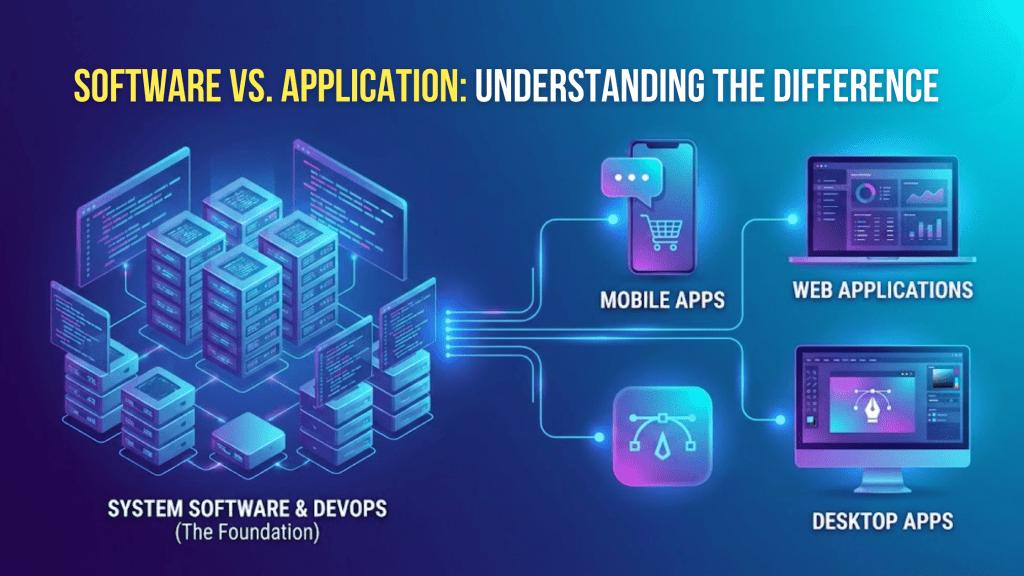
⚡ Quick Answer: Software is the broad category — it includes everything from your operating system to your apps. An application is a specific type of software designed for a user to interact with. A program is the underlying set of instructions. Every app is software, but not all software is an app.
Software and applications are often used interchangeably, but they are not the same. Understanding the difference between software and application is essential for businesses, developers, and startups building digital products.
In this guide, we explain the definitions, differences, and real-world use cases—while also covering how these concepts impact software development.
What Is Software and Application?
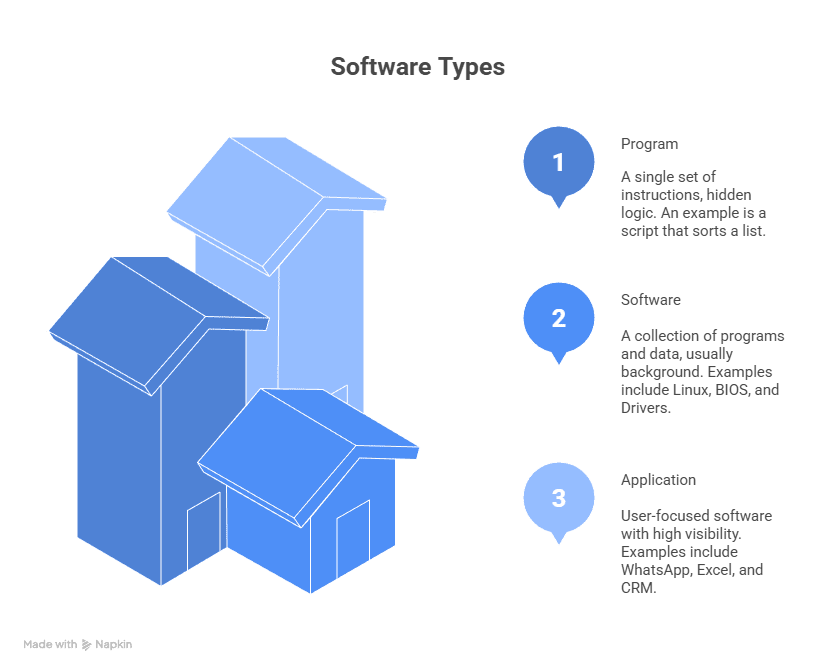
Software is a broad term that refers to all programs, systems, and data that run on a computer. It includes everything from operating systems to user-facing tools.
An application (or application software) is a type of software designed specifically for end users to perform tasks.
👉 In simple terms:
- Software = Parent category
- Application = Subcategory
Discover what application software is, explore its types, real-world examples & key benefits.
Difference Between Software and Application
The main difference lies in scope and purpose.
| Basis | Software | Application Software |
|---|---|---|
| Definition | Collection of programs | User-focused program |
| Scope | Broad | Specific |
| Purpose | Runs systems | Performs tasks |
| Examples | OS, drivers | Apps, SaaS tools |
👉 Every application is software, but not all software is an application.
Difference Between App and Software
An app is simply a short form of application software.
- All apps are software
- Apps are designed for end users
- Software includes apps and system-level programs
Example:
- Mobile banking app → App
- Windows OS → Software
Difference Between Software and Program
A program is a set of coded instructions written to perform a specific task. Software is a collection of multiple programs working together.
| Basis | Program | Software |
|---|---|---|
| Definition | Single instruction set | Collection of programs |
| Scope | Limited | Broad |
| Example | Script | Full system |
👉 Software = Multiple programs combined
Difference Between Application and Program
An application is designed for users, while a program may be a smaller technical component.
- Program → Backend logic or script
- Application → User-facing software
Example:
- Login script → Program
- Mobile app → Application
System Software vs Application Software
System software manages the computer system, while application software helps users perform tasks.
| Basis | System Software | Application Software |
|---|---|---|
| Role | Controls system | Helps users |
| Interaction | Background | User-facing |
| Examples | OS, drivers | Apps, SaaS |
👉 Both are essential for a functioning system.
Software Platform vs Application
A platform provides a foundation to run applications, while an application performs specific functions.
Example:
- Android → Platform
- Instagram → Application
Definition of Application Software
Application software is a type of software designed to help users perform specific tasks such as communication, business operations, or entertainment.
App vs Program — What’s the Difference?
A program is a single set of coded instructions that carries out a specific task, while an app (application) is user-facing software that lets people do something useful — often made up of several programs working together. Put simply, every app is built from programs, but not every program is an app. In everyday language, “program” tends to mean a broader or more technical piece of software (like a desktop .exe or a script), whereas “app” usually refers to a mobile or web application such as Instagram or Gmail.
Tool vs Application — What’s the Difference?
A tool is a utility application built to help with one narrow, specific task, whereas an application is
broader software designed around a complete user workflow. For example, Git, a screenshot utility, or
Grammarly are tools — they do one focused job — while Microsoft Word or Salesforce are full applications that support many related tasks. Technically every tool is a type of application, but people call it a “tool” when its purpose is narrow and utility-focused rather than a complete workspace.
Application vs Program — What’s the Difference?
The difference comes down to scope: a program is one set of instructions that performs a single task, and an application is complete, user-facing software that may combine multiple programs to deliver a full experience. A program can run quietly in the background or as a single executable, while an application is something an end user opens and interacts with directly, like a spreadsheet app or a booking system. So an application is usually made up of one or more programs, packaged together for people to actually use.
Software vs App — What’s the Difference?
Software is the umbrella term for all instructions that tell a computer what to do, and an app is just one type of software — the kind built for end users to complete a specific task. Every app is software, but software also includes things that aren’t apps, such as operating systems, drivers, and background programs. When people say “app,” they usually mean a user-facing mobile or web application; when they say “software,” they could mean anything from that app to the entire system running underneath it.
What Is Software Development?
Software development is the process of designing, building, testing, and maintaining software applications.
It includes:
- Planning
- Coding
- Testing
- Deployment
- Maintenance
Businesses rely on software development to create scalable digital products.
Why Understanding This Difference Matters
For startups and businesses, knowing the difference helps in:
- Choosing the right development approach
- Communicating with developers
- Planning scalable products
- Avoiding technical confusion
If you’re building a product, you’re most likely developing application software, not system software. custom application development services
Real-World Examples of Software Applications
- CRM systems
- SaaS platforms
- E-commerce websites
- Mobile apps
- Custom business tools
Companies often invest in custom application development to build unique solutions tailored to their needs.
Common Confusions (Clarified)
| Term | Meaning |
|---|---|
| Software | All programs |
| Application | User-focused software |
| Program | Single instruction set |
| App | Short for application |
When you are ready to build either one for your business, custom software development turns these concepts into a working product engineered for your specific workflows.
Frequently Asked Questions
Q: What is the difference between software and an application?
A: Software is the umbrella term for any instructions that tell a computer what to do. An application (or app) is a specific type of software built for end users to complete a task — like Excel or Gmail. So every application is software, but not all software is an application (an operating system, for example, is
software but not an application).
Q: Is an app the same as a program?
A: Not exactly. A program is a single set of instructions that performs a task. An app (application) is user-facing software that may contain several programs working together. In everyday use “app” usually means a mobile or web application, while “program” is a broader, more technical term.
Q: What is the difference between a tool and an application?
A: A tool is a utility application designed to help with one narrow task like Git or a screenshot utility. An application is broader and built around a complete user workflow. Every tool is an application, but most applications are more than a single tool.
Q: Is a platform the same as an application?
A: No. A platform is software that other applications are built on or run within like Salesforce, WordPress, or AWS. An application runs on top of a platform to deliver a specific function to users.
Q: What is the difference between system software and application software?
A: System software runs the computer itself (operating systems, drivers). Application software runs on top of it to help users do specific tasks (word processors, browsers, business apps
Q: Is “app” and “software” the same thing?
A: An app is one kind of software. “Software” includes apps plus everything else — operating systems, drivers, programs, and platforms.
Final Thoughts
Understanding the difference between software, applications, and programs is fundamental in today’s digital world.
Whether you’re a developer, business owner, or startup founder, this clarity helps you make better decisions when building or investing in technology.
Businesses that outgrow ready-made apps often turn to custom software development to build applications around their exact workflows.
Related articles

How to Evaluate a Custom Application Development Vendor: 7-Point Scorecard
Choosing the wrong custom application development vendor costs more than money. Use this 7-point scorecard — with scoring guide, red flags checklist, and first-call questions — to choose the right partner in 2026.

Custom Software Development Cost 2026: Hourly Rates by Region, Type & Budget Guide
Custom software costs $15K-$500K+ depending on complexity and region. US rates: $100-$250/hr. India: $20-$70/hr. Full breakdown by project type.
What Is Application Software? Definition, 12 Types & Examples (2026)
Application software is a program built for end-user tasks — think Word, Chrome, WhatsApp. Clear definition, 12 types with real examples, and how it differs from system software.
Let's build together
Let's build something that moves your business forward.
Tell us about your project and get a free, no-obligation estimate from our engineering team — typically within one business day.